



Uttar Pradesh Public Service Commission (UPPSC) has officially released the RO / ARO Typing Test Admit Card 2026 for candidates who qualified the written examination stage. This announcement has generated great enthusiasm among aspirants preparing for the Review Officer (RO) and Assistant Review Officer (ARO) recruitment. The typing test is an important phase of the selection process, and the admit card is a mandatory document to appear in this stage of the examination.This article provides a complete and professionally written guide on the UPPSC RO / ARO Typing Test Admit Card 2026, covering important information such as the downloading process, exam pattern, typing speed requirements, exam-day instructions, and preparation tips. The content is structured with SEO-optimized headings and informative paragraphs for better readability and search engine visibility.
UPPSC RO / ARO Typing Test Admit Card 2026 Overview
| Conducting Body | Uttar Pradesh Public Service Commission (UPPSC) |
|---|---|
| Exam Name | RO / ARO Hindi Typing Test 2026 (Advt. 2023) |
| Advertisement No. | A-7/E-1/2023 |
| Admit Card Release Date | 11 February 2026 |
| Typing Test Dates | 16–20 February 2026 |
| Total Vacancies | 411 Posts |
| Test Mode | Computer Based Typing Test (Hindi – Kruti Dev 010) |
| Official Website | uppsc.up.nic.in |
Important Dates
| Event | Date |
|---|---|
| Online Application Start | 09 October 2023 |
| Last Date to Apply Online | 24 November 2023 |
| Last Date to Pay Exam Fee | 24 November 2023 |
| Admit Card Available (Prelims) | 17 July 2025 |
| Preliminary Exam Date | 27 July 2025 |
| Preliminary Answer Key Available | 30 July 2025 |
| Preliminary Result Declared | 16 September 2025 |
| Mains Application | 17 October – 07 November 2025 |
| Mains Admit Card | 23 January 2026 |
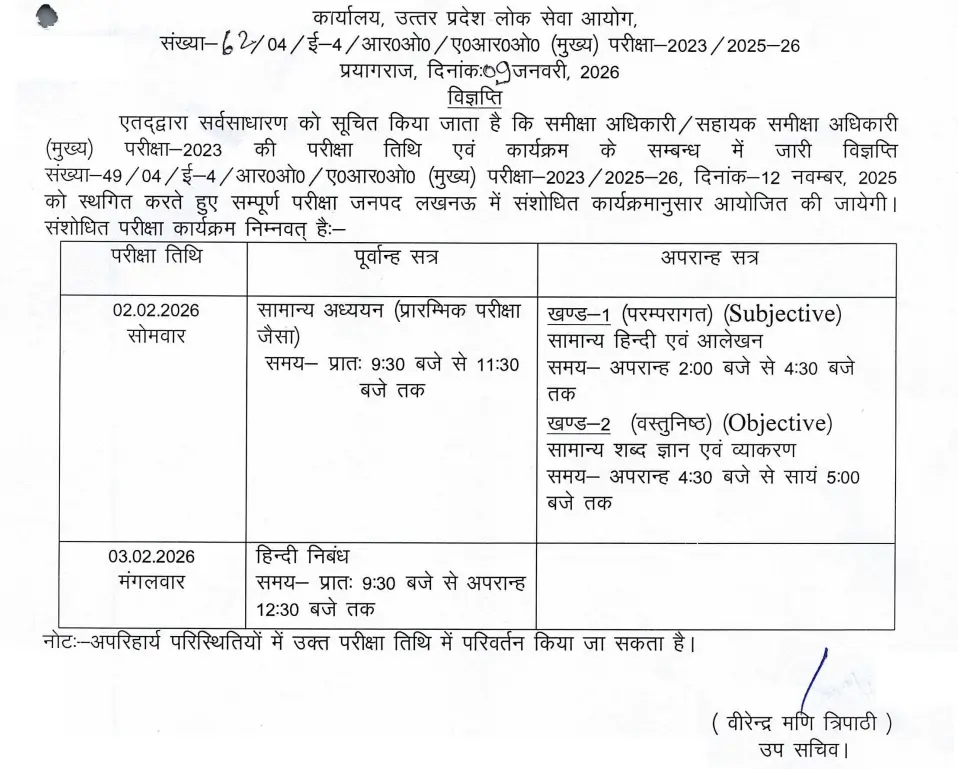
| Mains Exam Date | 02–03 February 2026 |
| Typing Test Admit Card | 11 February 2026 |
| Typing Test Date | 16–19 February 2026 |
Application Fee
| Category | Application Fee |
|---|---|
| General / EWS / OBC | Rs. 125/- |
| SC / ST | Rs. 65/- |
| PH Divyang | Rs. 25/- |
| Payment Mode | Debit Card, Credit Card, Net Banking Only |
Age Limit
| Parameter | Details |
|---|---|
| Minimum Age | 21 Years (as on 01-07-2023) |
| Maximum Age | 40 Years (as on 01-07-2023) |
| Age Relaxation | Extra as per Government Rules |
Vacancy Details
| Post Name | Total Vacancies |
|---|---|
| Review Officer / Assistant Review Officer (Samiksha Adhikari / Sahayak Samiksha Adhikari) | 411 |
Department/Post-wise Vacancy & Qualification
| Name of Department | Post Name | Total Post | Educational Qualification |
|---|---|---|---|
| UP Secretariat | Samiksha Adhikari | 322 | Bachelor’s degree in any stream from a recognized University in India |
| Uttar Pradesh Public Service Commission | Samiksha Adhikari | 09 | Bachelor’s degree in any stream from a recognized University in India |
| Board of Revenue (UP) | Samiksha Adhikari | 03 | Bachelor’s degree in any stream from a recognized University in India |
| UP Secretariat | Sahayak Samiksha Adhikari | 40 | Bachelor’s degree from a University established by law in India or equivalent recognized qualification “O” Level certificate awarded by DOEACC Society or equivalent Minimum 25 WPM in Hindi Typewriting; preference for English Typewriting |
| Board of Revenue (UP) | Sahayak Samiksha Adhikari | 23 | Bachelor’s degree from a University established by law in India or equivalent recognized qualification Minimum 25 WPM in Hindi Typewriting; preference for English Typewriting |
| Uttar Pradesh Public Service Commission | Sahayak Samiksha Adhikari | 13 | Bachelor’s degree from a University established by law in India or equivalent recognized qualification Diploma in Computer Science or “O” Level certificate awarded by DOEACC Society Minimum 25 WPM in Hindi Typewriting; preference for English Typewriting |
| Uttar Pradesh Public Service Commission | Sahayak Samiksha Adhikari (Account) | 01 | Bachelor’s degree in Commerce with Accountancy from a University established by law in India |
Pay Scale & Mode of Selection
| Parameter | Details |
|---|---|
| Pay Scale | Rs. 44,900 – 1,42,400 (Level-7) to Rs. 47,600 – 1,51,100 (Level-8) |
| Mode of Selection | Selection is based on Preliminary Exam, Main Exam, and Skill (Typing) Test |
Importance of the UPPSC RO / ARO Typing Test Admit Card 2026
The admit card plays a vital role in the examination process. It serves as official proof of a candidate’s eligibility to appear for the typing test and contains essential details such as the candidate’s name, roll number, registration number, examination date and time, test center address, and reporting instructions. Candidates must carry a printed copy of the admit card to the examination center, as entry will not be permitted without it.Apart from acting as an entry pass, the admit card also helps verify the candidate’s identity during the examination. Therefore, it is necessary to check all the information printed on it carefully. In case of any discrepancy in personal details or exam center information, candidates should immediately contact UPPSC authorities for correction.
How to Download UPPSC RO / ARO Typing Test Admit Card 2026
Candidates can download the UPPSC RO / ARO Typing Test Admit Card 2026 through the official website by following a simple online procedure. First, candidates need to visit the official website of the Uttar Pradesh Public Service Commission at uppsc.up.nic.in. On the homepage, they should look for the notification link related to the RO / ARO Typing Test Admit Card 2026. After clicking on the link, they will be redirected to the login page where they must enter their registration number and date of birth or password.Once the required details are submitted, the admit card will appear on the screen. Candidates should download the admit card and take at least two clear printouts for future reference. It is advisable to keep a digital copy saved on a mobile device or email for emergency access.
Details Mentioned on the Admit Card
The UPPSC RO / ARO Typing Test Admit Card 2026 contains important information related to the candidate and the examination. It includes the candidate’s full name, roll number, registration number, date of birth, photograph, and signature. It also displays the exact date and time of the typing test, along with the complete address of the examination center. Additionally, the admit card provides instructions regarding reporting time and prohibited items inside the examination hall.Candidates must ensure that all these details are correctly printed. If any error is found, such as a spelling mistake in the name or incorrect examination center details, they should immediately notify the commission to avoid complications on the examination day.
UPPSC RO / ARO Typing Test 2026 Exam Pattern
The typing test is designed to assess the candidate’s typing speed and accuracy in either Hindi or English. It is conducted in a computer-based format, where candidates are required to type a given passage within a fixed time limit. The purpose of this test is to ensure that candidates possess the basic typing skills necessary for clerical and administrative work in government offices.The typing test is qualifying in nature, meaning that the marks obtained in this stage are not added to the final merit list. However, clearing this stage is compulsory for final selection. Candidates who fail to meet the minimum typing standards are disqualified from further stages of the recruitment process.
Typing Speed Requirements
To qualify the UPPSC RO / ARO Typing Test 2026, candidates must meet the minimum typing speed criteria set by the commission. For Hindi typing, the required speed is 25 words per minute, while for English typing, candidates must achieve a speed of 30 words per minute. These standards are fixed to ensure efficiency and accuracy in official documentation work.Candidates should practice regularly to reach and maintain the required typing speed. Accuracy is equally important, as excessive mistakes may lead to disqualification even if the speed requirement is met.
Selection Process for UPPSC RO / ARO 2026
The selection process for UPPSC RO / ARO recruitment consists of multiple stages. Initially, candidates appear for the Preliminary Examination, which serves as a screening test. Those who qualify the prelims are eligible to appear for the Main Examination. After successfully clearing the mains examination, candidates are shortlisted for the typing test. The final stage of selection includes document verification, where original certificates and identity proofs are checked.Only candidates who clear all these stages are considered for final appointment to the posts of Review Officer and Assistant Review Officer under the Uttar Pradesh Public Service Commission.
Exam Day Instructions
Candidates must strictly follow the instructions mentioned on the admit card and those given by the examination authorities at the test center. They are advised to reach the examination venue at least one hour before the scheduled reporting time to complete the verification process smoothly. A printed copy of the admit card along with a valid photo identity proof such as Aadhaar Card, Voter ID, PAN Card, or Passport must be carried to the center.Electronic devices such as mobile phones, smartwatches, calculators, and Bluetooth gadgets are strictly prohibited inside the examination hall. Candidates should maintain discipline and follow all guidelines related to seating arrangements and test procedures. Any form of unfair practice may lead to cancellation of candidature.
Documents Required at the Examination Center
On the day of the typing test, candidates are required to carry specific documents for verification purposes. These include the UPPSC RO / ARO Typing Test Admit Card 2026 and a valid government-issued photo identity proof. It is also advisable to carry two recent passport-size photographs, although this may not be mandatory at all centers.Failure to produce the required documents may result in denial of entry to the examination hall, which can lead to disqualification from the recruitment process.
Common Problems While Downloading the Admit Card
Some candidates may face difficulties while downloading their admit card due to technical or personal errors. Common issues include entering incorrect login credentials, server problems due to heavy website traffic, slow internet connectivity, or incomplete registration details. Such problems usually occur during peak hours when a large number of candidates try to access the website simultaneously.To avoid these issues, candidates should try downloading the admit card during off-peak hours, such as early morning or late night, and ensure that their internet connection is stable.
What to Do If the Admit Card Is Not Available
If a candidate is unable to download the admit card even after repeated attempts, they should first recheck their login credentials carefully. Clearing the browser cache or using a different browser may also help. If the problem persists, candidates should contact UPPSC through the official helpline number or email ID mentioned on the website.In urgent cases, candidates may visit the nearest UPPSC regional office with proof of registration to resolve the issue before the examination date.
Preparation Tips for the Typing Test
Preparation for the typing test should focus on improving both speed and accuracy. Candidates are advised to practice typing daily using reliable typing software or online platforms. Maintaining proper finger placement and posture while typing can significantly improve performance. Practicing with mock typing tests helps candidates become familiar with the test environment and time pressure.For Hindi typing, candidates should practice using Kruti Dev or Mangal font as per the prescribed format. Regular practice and consistent effort are key to clearing the typing test successfully.
UPPSC RO / ARO Typing Test Result 2026
After the completion of the typing test, UPPSC will release the result on its official website. The result will include the list of candidates who have qualified the typing test stage. Shortlisted candidates will then be called for document verification and further recruitment formalities.Candidates are advised to regularly check the UPPSC website for official notifications related to the typing test result and subsequent procedures.
Frequently Asked Questions
Is the UPPSC RO / ARO Typing Test mandatory?
Yes, the typing test is mandatory and qualifying in nature. Candidates must clear this stage to be eligible for final selection.
Can candidates appear without the admit card?
No, candidates will not be allowed to enter the examination hall without a valid admit card.
What is the minimum typing speed required?
The minimum typing speed required is 25 words per minute for Hindi and 30 words per minute for English.
Can the exam center be changed?
No, the examination center once allotted cannot be changed under any circumstances.
Is there negative marking in the typing test?
No, the typing test does not include negative marking as it is only qualifying in nature.
Conclusion
UPPSC RO / ARO Typing Test Admit Card 2026 is a significant milestone in the recruitment process. Candidates who have cleared the written examinations must now focus on preparing for the typing test and ensure that they download their admit card well before the examination date.Verifying all details on the admit card, following exam-day instructions carefully, and practicing typing regularly will help candidates perform well in this crucial stage. With proper preparation and dedication, aspirants can move one step closer to securing a prestigious government position under the Uttar Pradesh Public Service Commission.For the latest updates regarding the typing test schedule, results, and further announcements, candidates should regularly visit the official UPPSC website.